2026-07-26
How Image Compression Algorithms Actually Work: DCT, LZW & AVIF
How image compression actually works: DCT converts 8x8 pixel blocks into frequencies, Huffman and LZW pack the coefficients, and AVIF beats JPEG with measured examples.
More image optimization, AI editing, and visual content SEO guides from Imagic AI. Page 4 of 13.
2026-07-26
How image compression actually works: DCT converts 8x8 pixel blocks into frequencies, Huffman and LZW pack the coefficients, and AVIF beats JPEG with measured examples.
2026-07-26
A technical walkthrough of how image compression works: chroma subsampling, DCT, quantization, PNG filtering, and where each format wins, with practical quality settings.
2026-07-26
Compress JPEG, PNG, and WebP images in Python using Pillow, cwebp, and mozjpeg, with quality settings, target-size loops, and a fast batch script.
2026-07-26
Generate a depth map from a photo to add 3D parallax, bokeh, and focus effects. Real methods for depth estimation, how parallax works, and where AI depth works.
2026-07-26
What each image format is for, when to use JPEG vs PNG vs WebP vs AVIF vs SVG vs GIF, with real measured file sizes and a practical decision rule for web images.
2026-07-26
A practical image SEO checklist for 2026: what Google and Bing need to rank an image, plus alt text, filenames, formats, Core Web Vitals, and the audit.
2026-07-26
Image quality enhancement explained: the defects you can fix (blur, noise, low resolution, exposure), the honest limits, and the workflow order that decides the result.
2026-07-26
Resize an image without losing quality: keep the aspect ratio, only resize down, pick the right resampling filter, and resize before compressing, with real sizes.
2026-07-26
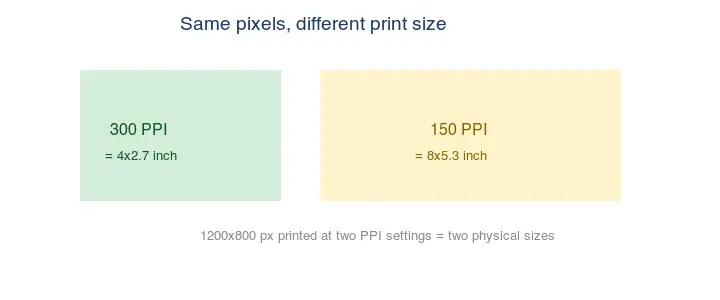
What image resolution and DPI (PPI) mean, how pixels translate to print size, why DPI matters for print but not for screens, and the resolution each use case needs.
2026-07-26
Image resolution explained: what pixels and DPI actually do, the 300 DPI print rule, web vs screen sizes, and when upscaling is worth it.

2026-07-26
Exact Instagram image sizes for 2026: feed posts, Stories, Reels covers, profile photos, and carousels. Pixel dimensions, aspect ratios, and file rules I tested.
2026-07-26
Turn a set of JPG images into a single ordered PDF for portfolios, reports, and submissions. Free methods for each device, page ordering, and quality settings.
2026-07-26
MCP is Anthropic's open standard for connecting AI assistants to data sources and tools. Learn the client-server model, transport, capabilities, and how to run servers.
2026-07-26
Imagic AI's 2026 batch update ships multi-file queues, keyboard shortcuts, and a zip download. I tested it on 50 images — what shipped and how to use it.

2026-07-26
Why passport photos need a white or off-white background, which documents require it, how to shoot or change to white, and the edge and lighting rules that pass.
2026-07-26
Convert PNG to WebP for smaller web files. When lossless WebP wins, when lossy does, real measured sizes, and the cwebp and Pillow commands with a PNG fallback.
2026-07-26
What Real-ESRGAN is, how its GAN-based super-resolution works, what it does well (4x upscaling of photos and art) and where it fails, with commands and honest limits.

2026-07-26
Remove a watermark from a photo you own: crop, clone stamp, content-aware fill, and AI inpainting ranked by difficulty, plus when removal is and isn't allowed.