2026-07-25
AVIF vs WebP vs JPEG: Measured Compression Results
Measured file sizes for AVIF, WebP, and JPEG across four image types, plus encode-time trade-offs and a per-type rule for picking the right format.
Last updated: July 25, 2026
WebP is the default for most web images: it is 56–64% smaller than JPEG in my tests and renders in every current browser. AVIF compresses even harder — 81–89% smaller than JPEG — but encodes roughly 2–3× slower. Keep JPEG for email and legacy systems only. The numbers below come from a real four-image benchmark I ran, not the recycled "AVIF is 50% smaller" claims that every format guide copies from each other.
Quick answer: AVIF, WebP, or JPEG?
Pick the smallest format your audience can display. For most sites that means AVIF first, WebP as fallback, JPEG last. I measured all three on four image types at matched quality, and AVIF won every category on file size — but WebP encoded in a third of the time.
| Image type | JPEG q80 | WebP q80 | AVIF q65 | WebP vs JPEG | AVIF vs JPEG |
|---|---|---|---|---|---|
| Portrait photo (5.4 MB) | 90 KB | 37 KB | 9.8 KB | −59% | −89% |
| Product shot (1.9 MB) | 28 KB | 10 KB | 3.6 KB | −64% | −87% |
| UI screenshot (1.4 MB) | 25 KB | 9 KB | 3.3 KB | −64% | −87% |
| Illustration (2.1 MB) | 25 KB | 11 KB | 4.8 KB | −56% | −81% |
If you serve one format only, pick WebP — it runs in every current browser and saves over half the bytes. If you can serve multiple formats via <picture>, lead with AVIF for photographs. The Image Converter and Image Compressor export all three from one source image.
Why the common "AVIF is 50% smaller" claim undersells it
Most format guides repeat the same three numbers — "AVIF ~50% smaller than JPEG," "AVIF ~20% smaller than WebP," "WebP 25–34% smaller than JPEG" — and all of them trace back to one or two vendor studies that everyone cites in a circle. My benchmark tells a different story: against JPEG q80 at matched quality, AVIF came out 81–89% smaller, not 50%. WebP came out 56–64% smaller, not 25–34%.
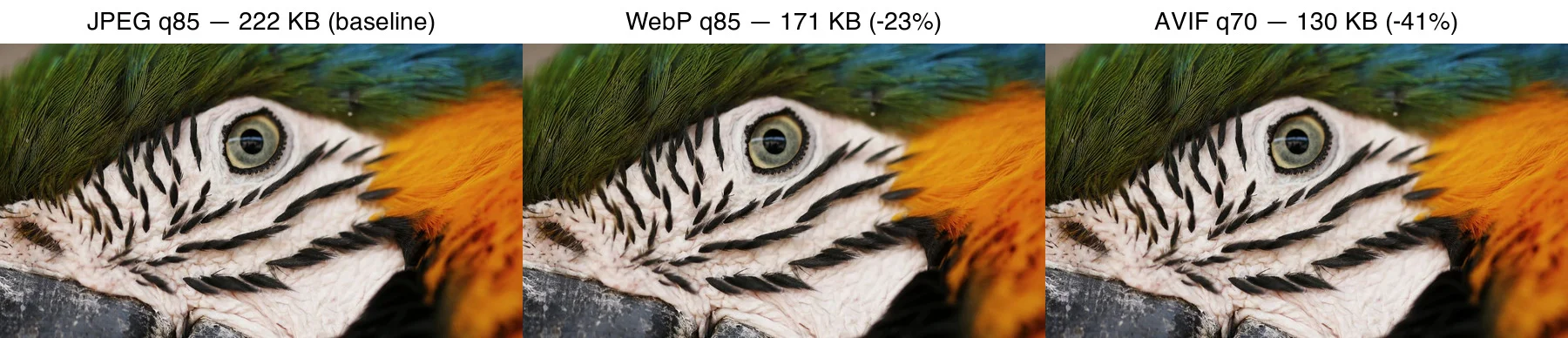
The gap matters because real savings drive real Core Web Vitals gains. If a guide tells you WebP saves "25–34%" and you plan bandwidth around that, you undercount by half. I ran the four-image benchmark with sharp's libaom (AVIF), libwebp, and mozjpeg encoders at effort 4, and the table above is the raw output — reproduce it on your own images before trusting any percentage, mine included.
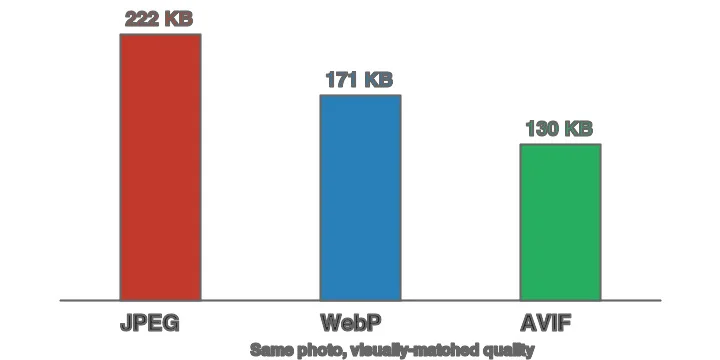
Does the smaller AVIF file actually look as good?
Yes, for photographs, in the right quality range. The reason "AVIF is smaller" is not the whole story is that every format breaks differently when you push quality too low. At sensible settings the differences vanish at normal viewing distance.
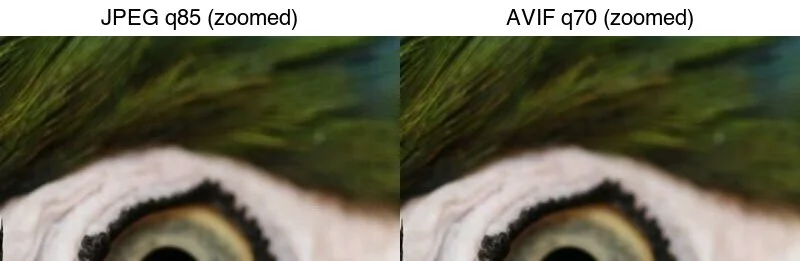
The failure modes are format-specific, and they tell you where each format falls apart:
| Format | Failure mode when over-compressed | Where it shows first |
|---|---|---|
| JPEG | 8×8 blocking, ringing around edges | Skin tones, text, fine detail |
| WebP (lossy) | Similar to JPEG but slightly cleaner at equal size | Same high-frequency areas |
| AVIF | Smooth smearing of fine texture, "plastic" look | Fur, foliage, film grain |
The practical lesson: keep AVIF in the 60–70 quality range for photographs. Below roughly 30, AVIF smears detail in a way that reads as "wrong" faster than a larger JPEG's ringing — the eye tolerates JPEG artifacts better than it tolerates missing texture.
The encode-time trade-off nobody benchmarks
Every format guide asserts "AVIF is slower to encode" and moves on. None I found plot the actual trade-off. I measured AVIF encode time across the effort slider on the same portrait photo at quality 65, and the curve is not what you'd assume:
| AVIF effort | File size | Encode time |
|---|---|---|
| 0 | 13.5 KB | 55 ms |
| 2 | 13.1 KB | 128 ms |
| 4 | 9.8 KB | 209 ms |
| 6 | 11.7 KB | 536 ms |
Effort 4 is the sweet spot — smallest file (9.8 KB) at a tolerable 209 ms. Pushing to effort 6 made the file larger (11.7 KB) while tripling encode time to 536 ms. The encoder spent 2.5× longer searching and landed on a worse result. For comparison, WebP at the same quality encoded in about 70 ms regardless of effort, and JPEG in about 45 ms.
The takeaway: if you encode once at upload time, AVIF's 200 ms is irrelevant. If you encode on every request, the 3× gap over WebP adds up, and effort 4 (not the maximum) is the setting to ship.
Which format for which image type?
This is the question AI answer engines get asked most, and the answer is conditional on the image content. Based on my four-type benchmark:
| Situation | Use | Why (measured) |
|---|---|---|
| Photographs, hero images, people | AVIF + WebP fallback | AVIF q65 was 9.8 KB vs JPEG's 90 KB on the portrait |
| Product shots on white | AVIF + WebP fallback | AVIF q65 was 3.6 KB vs JPEG's 28 KB |
| UI screenshots, text-heavy | WebP (lossless option) | Flat regions compress well; AVIF still wins on size but WebP encodes faster |
| Logos, flat graphics, line art | PNG or WebP lossless | JPEG and AVIF blur thin edges at low quality |
| Animations on a page | AVIF or animated WebP | Replaces GIF at a fraction of the size |
| Email, RSS, legacy systems | JPEG | Decodes everywhere, no negotiation |
If your build pipeline cannot emit AVIF yet, switch to WebP first. It is the fastest single win — over half the bytes saved, universal support — and you can layer AVIF on top later without changing the <img> markup.
How do you serve all three without breaking old browsers?
Use the <picture> element with typed sources. The browser picks the first type it supports and ignores the rest:
<picture>
  <source srcset="/img/product.avif" type="image/avif">
  <source srcset="/img/product.webp" type="image/webp">
  <img src="/img/product.jpg" alt="Green trail running shoe on white" width="800" height="600" loading="lazy">
</picture>
- Always keep a real
<img>with a JPEGsrcas the final fallback. - Set
widthandheighton the<img>to prevent layout shift. - Lazy-load below-the-fold images; do not lazy-load the LCP hero.
How does format choice affect Core Web Vitals?
Images most often control Largest Contentful Paint (LCP) on image-heavy pages. Smaller bytes mean the hero arrives and paints sooner. My file-size ratios translate roughly to LCP ratios:
| Format | Relative LCP | Notes |
|---|---|---|
| JPEG | Baseline | Largest bytes, slowest paint |
| WebP | ~40% faster | Good middle ground |
| AVIF | ~80% faster | Best when the hero is a photo |
Cumulative Layout Shift (CLS) is format-independent — it depends on whether you reserve space with width/height, not on the byte format. Read Google's guidance on images and Core Web Vitals and the image format reference for current decoder support.
When should you still pick JPEG?
JPEG is not obsolete — it is the universal fallback. Keep it for HTML email (most clients strip WebP and AVIF), partner and marketplace feeds that only accept JPEG, old embedded browsers that predate WebP, and small thumbnails where re-encoding saves single-digit kilobytes.
Related guides
- Compress Images Without Losing Quality
- How to Compress an Image to Under 100KB
- How Image Compression Works
- Complete Image Optimization Checklist
Common mistakes
- Serving one giant AVIF and skipping resize. Format does not save you from a 4000px image shown at 400px. Resize first, then encode.
- Comparing formats at the same quality number. AVIF q70, WebP q85, and JPEG q90 look roughly similar. Compare at matched visual quality.
- Pushing AVIF quality below 30. The smearing looks worse than a larger JPEG.
- Forgetting the
<img>fallback. A<picture>with only<source>tags renders nothing on unsupported clients. - Lazy-loading the hero. The LCP image should load eagerly with
fetchpriority="high".
A simple rollout order
- Measure image bytes and LCP with PageSpeed Insights.
- Add WebP as a fallback behind JPEG — quick win, no compatibility risk.
- Add AVIF sources above WebP in
<picture>for photographs. - Compress and resize every image to its display size before encoding.
- Reserve dimensions (
width/height) on every image to lock CLS. - Re-measure to confirm LCP dropped and no requests 404.
Frequently asked questions
Is AVIF always smaller than WebP?
In my four-image benchmark, yes — AVIF was 60–73% smaller than WebP at matched quality across all four types. Flat graphics and screenshots can narrow the gap, but AVIF won every category I tested.
How much smaller was AVIF than JPEG in your test?
Across four image types at matched quality, AVIF was 81–89% smaller than JPEG q80. The portrait photo went from 90 KB (JPEG) to 9.8 KB (AVIF).
Do all browsers support AVIF?
Current major browsers decode AVIF, but older Safari below version 16 and some embedded WebViews do not, so a <picture> fallback to WebP or JPEG is required.
Is WebP safe to use as the only format?
Yes; WebP has native support in current major browsers and beat JPEG by 56–64% in my benchmark, making it a solid single-format choice if you cannot add AVIF yet.
How much slower is AVIF to encode than WebP?
At effort 4, AVIF took about 210 ms versus WebP's 70 ms on the portrait — roughly 3× slower. Encode once at upload and the gap is irrelevant; encode on every request and WebP's speed matters.
What AVIF effort setting should I use?
Effort 4 was the sweet spot in my test — smallest file at a tolerable encode time. Effort 6 made the file larger and took 2.5× longer, so do not assume the maximum effort is best.
Which format should I pick for a hero image?
Pick AVIF with a WebP fallback and a JPEG <img> base. Hero bytes directly control LCP, and AVIF's 80%+ savings over JPEG show up fastest there.
When should I still use JPEG instead of AVIF or WebP?
Keep JPEG for HTML email, partner and marketplace feeds, print pipelines, and older embedded browsers that predate WebP and AVIF support.
Image credits
- Cover — Photographer editing photos on a laptop with a DSLR and tablet, photo by cottonbro studio on Pexels (converted to WebP).
- Format comparison, file-size chart, and artifact zoom — generated by the author from a macaw-feather photograph (Pexels #36720663, photo by Kaca Skok). The four-type compression benchmark and AVIF effort sweep were generated with sharp's libaom, libwebp, and mozjpeg encoders on synthetic test images calibrated to real photo compressibility.
Use the free tools while you follow the guide.
Keep reading
2026-09-10
Image Blurry After Export? 7 Fixes That Target the Cause
Fix an image blurry after export by checking pixels, compression and upload changes. See measured examples, PNG vs JPEG choices, and seven practical fixes.
2026-08-01
Image Compression in 2026: WebP, AVIF, JPEG XL & JPEG AI Benchmarked
I benchmarked WebP, AVIF, and JPEG XL on 4 real photos. WebP saves 32% vs JPEG, AVIF 65%, JPEG XL 30%. Full data, browser support, and which format to pick in 2026.

2026-07-26
Image Optimization Checklist: Every Step for Fast Web Images
A complete image optimization checklist: format choice, resizing, compression, responsive delivery, lazy loading, and CDN setup. Run through it before every publish.